
Use Cases: Vouchers

This section describes the processes at the SIHOT.POS cash desk that send requests to your voucher server, and what your server has to do in each process.

Check a Voucher

When the cashier scans or enters a voucher code, SIHOT.POS requests the details of the voucher with GetVoucher and shows them to the cashier.

Sample Request – POST <base URL>voucher/GetVoucher

JSON
{
  "branchNumber": 0,
  "voucherId": "GV-100245"
}

Sample Response – voucher found (HTTP 200)

JSON
{
  "voucherId": "GV-100245",
  "voucherValueTotal": 50,
  "voucherValueRemaining": 32.5,
  "currency": "EUR",
  "saleDate": "2026-10-12T00:00:00Z",
  "expiryDate": "2028-10-12T00:00:00Z",
  "status": "valid",
  "redeemSettlementMode": "payment"
}

If the voucher does not exist, answer with HTTP status 281.

SIHOT.POS shows the cashier the status of the voucher:

status Shown at the POS
valid The voucher is valid.
notValid The voucher is not valid.
redeemed The voucher is completely redeemed.
expired The voucher has expired.
blocked The voucher status is unknown.

A voucher can be redeemed only if status is valid, voucherValueRemaining is greater than 0, the voucher is sold (saleDate is a real sale date, not 1899-12-30T00:00:00Z) and the day before expiryDate has not passed yet. See Implementation Basics.

Redeem a Voucher

The guest pays a bill, completely or partly, with a voucher.

This process involves:

  • GetVoucher: SIHOT.POS checks the voucher.
  • RedeemVoucher: SIHOT.POS redeems the amount.
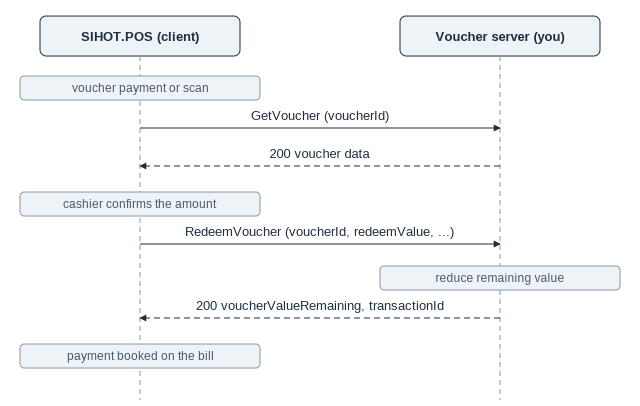
Sequence: GetVoucher, cashier confirms the amount, RedeemVoucher, payment booked

Process at the POS

  1. The cashier selects the voucher payment method or scans the voucher code on an open bill.
  2. SIHOT.POS requests the voucher with GetVoucher and shows the remaining value. The amount to redeem is the open amount of the bill, but at most the remaining value of the voucher. The cashier can change it.
  3. When the cashier confirms, SIHOT.POS sends RedeemVoucher.
  4. After a successful response, SIHOT.POS books the redeemed amount as payment on the bill.

Several vouchers can be redeemed on one bill. SIHOT.POS sends one RedeemVoucher request per voucher.

What Your Server Does

  • Reduce the remaining value of the voucher by exactly redeemValue. A voucher can be redeemed partly; the rest stays available. SIHOT.POS books exactly this amount as payment.
  • If redeemValue is greater than the remaining value, reject the request with an error.
  • If the same request arrives a second time after a network error, do not redeem the amount twice. See Repeated Requests.
  • Return the new remaining value and a unique transactionId.
  • If the voucher is completely redeemed, return redeemed as status in later GetVoucher responses.

Sample Request – POST <base URL>voucher/RedeemVoucher

JSON
{
  "branchNumber": 0,
  "voucherId": "GV-100245",
  "redeemValue": 17.5,
  "billNumber": "4711",
  "tillNumber": 1,
  "revenueDate": "2026-11-04T23:00:00.0Z"
}

Sample Response – HTTP 200

JSON
{
  "voucherId": "GV-100245",
  "voucherValueTotal": 50,
  "voucherValueRemaining": 15,
  "currency": "EUR",
  "transactionId": "TX-20261105-000815"
}

If you reject the redemption, answer with an error status and an error message. SIHOT.POS shows the message to the cashier, and the payment is not booked.

Sample Error Response – HTTP 400

JSON
{
  "error": {
    "code": "InsufficientValue",
    "message": "The remaining value of the voucher is too low."
  }
}
NOTE

revenueDate is the business date of SIHOT.POS, converted to UTC. In the example, the business date is 2026-11-05 in Central European Time. See Implementation Basics.

Cancel a Redemption

A voucher redemption is cancelled in the following cases:

  • The cashier cancels a voucher payment on an open bill, for example because it was booked by mistake.
  • A settled bill with a voucher payment is cancelled at a SIHOT.POS terminal, for example with the functions to cancel a bill, to reopen a bill, to change the payment type or to cancel a bill from the history. SIHOT.POS reverses each voucher payment on the bill and sends one cancellation for each of them.

This process involves:

  • GetVoucher: SIHOT.POS checks the voucher.
  • CancelRedemption: SIHOT.POS cancels the redemption.
  • GetVoucher: SIHOT.POS requests the updated voucher.
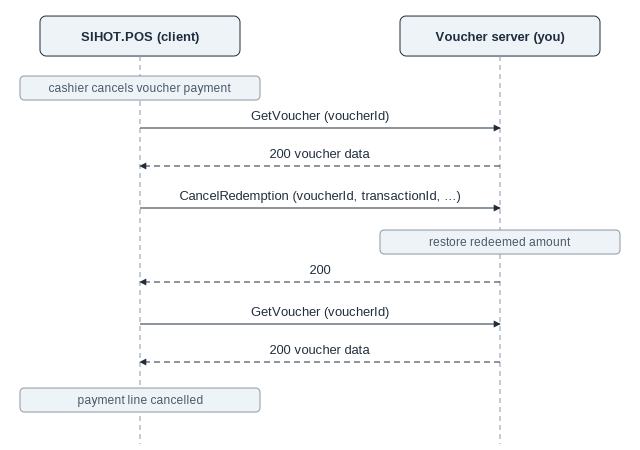
Sequence: GetVoucher, CancelRedemption, GetVoucher, payment line cancelled

What Your Server Does

  • Find the redemption by transactionId and revert it: add the redeemed amount back to the remaining value of the voucher.
  • Answer with HTTP status 200. SIHOT.POS then cancels the payment line on the bill.
  • If the redemption cannot be cancelled, answer with an error status. SIHOT.POS then does not cancel the payment line. When a settled bill is cancelled, the cancellation of the bill is aborted.
  • Only the HTTP status counts. SIHOT.POS does not evaluate the response body of CancelRedemption.

Sample Request – POST <base URL>voucher/CancelRedemption

JSON
{
  "branchNumber": 0,
  "voucherId": "GV-100245",
  "transactionId": "TX-20261105-000815",
  "billNumber": "4711"
}

Sample Response – HTTP 200

JSON
{
  "value": true
}
NOTE

Use transactionId to identify the redemption. billNumber is only a reference to the bill in SIHOT.POS and can differ from the value sent in RedeemVoucher.
NOTE

SIHOT.POS does not send a cancellation to your server when a settled bill is cancelled or credited through the SIHOT.POS REST Open API, or when only the payment method of a settled bill is changed at the terminal (function to change the payment method only). In these cases the voucher stays redeemed on your server.

Sell a Voucher

The guest buys a voucher at the cash desk. The voucher already exists in your system, for example as a pre-printed voucher card, and is activated with the sale.

This process involves:

  • GetVoucher: SIHOT.POS checks that the voucher can be sold.
  • SellVoucher: SIHOT.POS sells the voucher.
  • GetVoucher: SIHOT.POS requests the sold voucher.
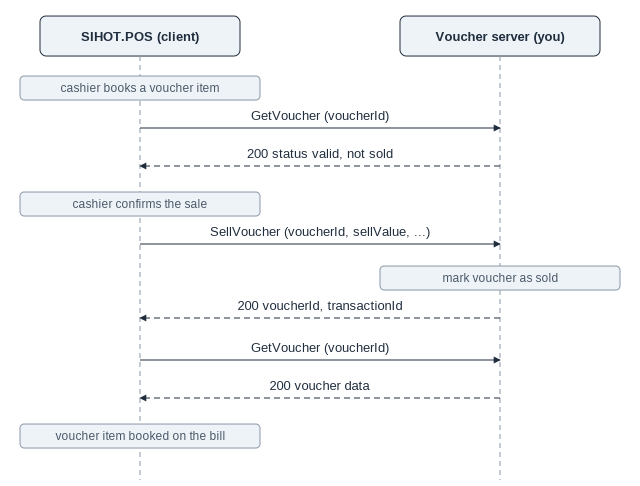
Sequence: GetVoucher, SellVoucher, GetVoucher, voucher item booked

Process at the POS

  1. The cashier books a voucher item and scans or enters the voucher code.
  2. SIHOT.POS requests the voucher with GetVoucher. The voucher can be sold if status is valid and it is not sold yet (saleDate is 1899-12-30T00:00:00Z).
  3. When the cashier confirms, SIHOT.POS sends SellVoucher with the value of the voucher.
  4. After a successful response, SIHOT.POS requests the voucher again and books the voucher item on the bill with the value sellValue.

What Your Server Does

  • Mark the voucher as sold: set saleDate and the value sellValue.
  • Return the voucherId and a unique transactionId for the sale. SIHOT.POS requests the voucher with this voucherId afterwards.
  • If the same request arrives a second time after a network error, do not sell the voucher twice. See Repeated Requests.

Sample Request – POST <base URL>voucher/SellVoucher

JSON
{
  "branchNumber": 0,
  "voucherId": "GV-100300",
  "sellValue": 50,
  "billNumber": "4712",
  "tillNumber": 1,
  "revenueDate": "2026-11-05"
}

Sample Response – HTTP 200

JSON
{
  "voucherId": "GV-100300",
  "voucherValueTotal": 50,
  "voucherValueRemaining": 50,
  "currency": "EUR",
  "transactionId": "TX-20261105-000816"
}

Cancel the Sale of a Voucher

The cashier cancels the voucher item on the bill, for example because the guest does not want the voucher anymore.

This process involves:

  • GetVoucher: SIHOT.POS checks the voucher.
  • CancelSellVoucher: SIHOT.POS cancels the sale.
  • GetVoucher: SIHOT.POS requests the updated voucher.

What Your Server Does

  • Find the sale by transactionId. If the voucher has not been redeemed yet, revert the sale: the voucher is no longer sold.
  • Answer with HTTP status 200.
  • If the voucher has already been redeemed, or the sale cannot be cancelled for another reason, answer with an error status.

Sample Request – POST <base URL>voucher/CancelSellVoucher

JSON
{
  "branchNumber": 0,
  "voucherId": "GV-100300",
  "transactionId": "TX-20261105-000816",
  "billNumber": "4712"
}

Sample Response – HTTP 200

JSON
{
  "value": true
}

Further Endpoints

The Reference also describes the endpoints CreateVoucher (create a new voucher) and AddBillToTransaction (add the bill as PDF to a transaction). Please contact us before you implement them.