
Every request to the SIHOT.POS REST Open API runs within a session. You open a session with /api/v1/auth, send the returned security id with every following request and close the session with /api/v1/close.
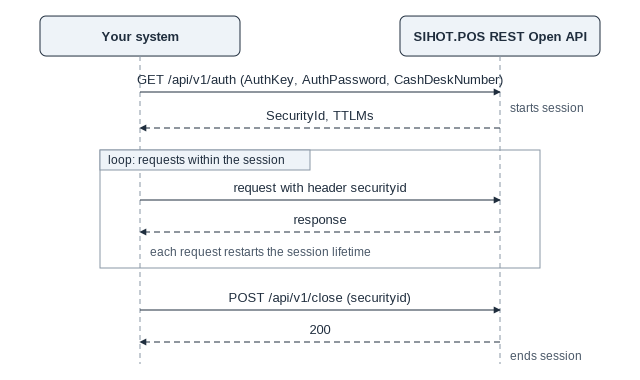
A session represents a SIHOT.POS user who is logged in at a cash desk:
The hotel sets up the user and the cash desk for your interface and provides you with the user number, the password and the cash desk number.
For each session, SIHOT.POS starts a separate process on the SIHOT.POS host. Within a session, requests are processed one after another.
Request – GET /api/v1/auth
| Parameter | Location | Required | Description |
|---|---|---|---|
AuthKey |
Header | Yes | Number of the SIHOT.POS user (waiter). |
AuthPassword |
Header | Yes | Password of this user. |
CashDeskNumber |
Query | Yes | Number of the cash desk. |
X-API-Key |
Header | Only if configured | API key, if the hotel has configured one in SIHOT.POS. See API Key. |
Response
| Field | Description |
|---|---|
DateTime |
Time of the successful authentication, ISO 8601 in UTC. |
SecurityId |
Security id of the session. Send it in the header securityid of every following request. |
TTLMs |
Lifetime of the session in milliseconds without a request (3600000 = one hour). |
Send the security id in the header securityid:
The session expires one hour (TTLMs) after the last request. Every request with a valid security id restarts this period.
After the session has expired, requests return 401 with the message Unauthorized access. Invalid security id. Please authenticate connection again. Open a new session in this case.
Close the session as soon as you no longer need it. This ends the process that SIHOT.POS has started for the session.
Request – POST /api/v1/close
| Parameter | Location | Required | Description |
|---|---|---|---|
securityid |
Header | Yes | Security id of the session. |
X-API-Key |
Header | Only if configured | API key, if configured. |
A successful call returns 200.
The hotel can configure an API key in SIHOT.POS. If an API key is configured, every request must contain it in the header X-API-Key, including /api/v1/auth and /api/v1/close. The key is case-sensitive. If the key is missing or wrong, the request returns 401 with the message Invalid API key.
If no API key is configured, the header is not checked.
/api/v1/close without it, the call returns 401 and the session is not closed.
| Status | Message | Cause |
|---|---|---|
400 |
Required details are missing. |
AuthKey, AuthPassword or CashDeskNumber is missing, or CashDeskNumber is not a number. |
401 |
Authentication failed. |
The user number, the password or the cash desk number is wrong. |
401 |
Unauthorized access. |
The header securityid is missing. |
401 |
Unauthorized access. Invalid security id. Please authenticate connection again. |
The security id is unknown or the session has expired. For /api/v1/close, the message is Unauthorized access. Invalid security id. |
401 |
Invalid API key. |
An API key is configured and the header X-API-Key is missing or wrong. |
The structure of error responses is described in API Basics.