Use Cases: Client Onboarding

This section outlines possible integration scenarios to support new-client onboarding, such as retrieving client-specific master files and configuration data. These examples are not tied to any specific solution but illustrate some processes you might need to implement as part of your integration.


Each hotel can define its own categories, labels, and operational options (e.g., room types, rate plans, person types).

By using the web service to load combo box values before implementation, you can verify that the client’s custom configurations are correctly received and displayed. This proactive approach helps identify any inconsistencies or missing data early in the process.

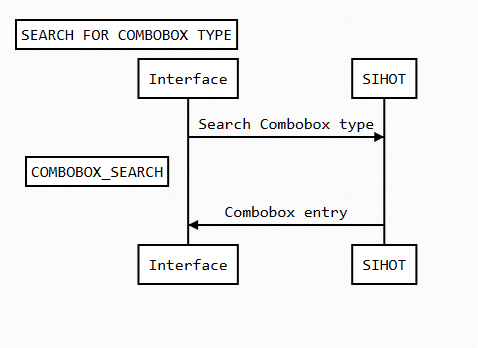
This process involves a S_COMBOBOX_SEARCH by a specific type.

Description Combobox Type
Room categories 19
Cleaning status 26
Market segment MA
Document type PL
Person type PG
Guest type 92
VIP1 13
VIP2 vi
language 10
restrictions RV
maintenence statuses 27

Sample Request – S_COMBOBOX_SEARCH

REST
{
    "TransactionID": "",
    "Search": {
        "Type": "26",
        "Language": "EN"
    }
}
SOAP
<soapenv:Envelope xmlns:soapenv="http://schemas.xmlsoap.org/soap/envelope/" xmlns:envgen="http://soapenvelopegenerator.eduardocastro.info/" xmlns:wsdl="http://schemas.xmlsoap.org/wsdl/" xmlns:soap="http://schemas.xmlsoap.org/wsdl/soap/" xmlns:xsd="http://www.w3.org/2001/XMLSchema">
    <soapenv:Header />
    <soapenv:Body>
        <S_COMBOBOX_SEARCHRequest xmlns="http://www.gubse.com/IFS/Services_v2.0.xsd">
            <!--Optional-->
            <TransactionID></TransactionID>
            <Authentication>
                <SecurityID></SecurityID>
            </Authentication>
            <Search>
                <Type>26</Type>
                <!--Optional-->
                <Language>EN</Language>
            </Search>
        </S_COMBOBOX_SEARCHRequest>
    </soapenv:Body>
</soapenv:Envelope>

Sample Response – S_COMBOBOX_SEARCH

REST
{
    "Result": {
        "Success": true,
        "ErrorMsg": "",
        "MSG-LIST": {
            "MSG-ENTRY": []
        }
    },
    "ComboBox": {
        "Type": "26",
        "Entry": [
            {
                "Language": "EN",
                "Key": "05",
                "Value": "Additional Work",
                "Sorting": "ADDITIONAL WORK",
                "Locked": false,
                "Hidden": false
            },
            {
                "Language": "EN",
                "Key": "06",
                "Value": "Arrival Not Clean",
                "Sorting": "ARRIVAL NOT CLEAN",
                "Locked": false,
                "Hidden": false
            },
            {
                "Language": "EN",
                "Key": "01",
                "Value": "Dirty",
                "Sorting": "DIRTY",
                "Locked": false,
                "Hidden": false
            },
            {
                "Language": "EN",
                "Key": "02",
                "Value": "In Process",
                "Sorting": "IN PROCESS",
                "Locked": false,
                "Hidden": false
            },
            {
                "Language": "EN",
                "Key": "03",
                "Value": "Inspection",
                "Sorting": "INSPECTION",
                "Locked": false,
                "Hidden": false
            },
            {
                "Language": "EN",
                "Key": "04",
                "Value": "Room OK",
                "Sorting": "ROOM OK",
                "Locked": false,
                "Hidden": false
            }
        ]
    }
}
SOAP
<?xml version="1.0" encoding="UTF-8"?>
<SOAP-ENV:Envelope xmlns:SOAP-ENV="http://schemas.xmlsoap.org/soap/envelope/" xmlns:xsi="http://www.w3.org/2001/XMLSchema-instance" xmlns:xsd="http://www.w3.org/2001/XMLSchema">
    <SOAP-ENV:Body>
        <S_COMBOBOX_SEARCHResponse xmlns="http://www.gubse.com/IFS/Services_v2.0.xsd">
            <Result>
                <Success>true</Success>
                <ErrorMsg/>
                <MSG-LIST/>
            </Result>
            <ComboBox>
                <Type>26</Type>
                <Entry>
                    <Language>EN</Language>
                    <Key>05</Key>
                    <Value>Additional Work</Value>
                    <Sorting>ADDITIONAL WORK</Sorting>
                    <Locked>0</Locked>
                    <Hidden>0</Hidden>
                </Entry>
                <Entry>
                    <Language>EN</Language>
                    <Key>06</Key>
                    <Value>Arrival Not Clean</Value>
                    <Sorting>ARRIVAL NOT CLEAN</Sorting>
                    <Locked>0</Locked>
                    <Hidden>0</Hidden>
                </Entry>
                <Entry>
                    <Language>EN</Language>
                    <Key>01</Key>
                    <Value>Dirty</Value>
                    <Sorting>DIRTY</Sorting>
                    <Locked>0</Locked>
                    <Hidden>0</Hidden>
                </Entry>
                <Entry>
                    <Language>EN</Language>
                    <Key>02</Key>
                    <Value>In Process</Value>
                    <Sorting>IN PROCESS</Sorting>
                    <Locked>0</Locked>
                    <Hidden>0</Hidden>
                </Entry>
                <Entry>
                    <Language>EN</Language>
                    <Key>03</Key>
                    <Value>Inspection</Value>
                    <Sorting>INSPECTION</Sorting>
                    <Locked>0</Locked>
                    <Hidden>0</Hidden>
                </Entry>
                <Entry>
                    <Language>EN</Language>
                    <Key>04</Key>
                    <Value>Room OK</Value>
                    <Sorting>ROOM OK</Sorting>
                    <Locked>0</Locked>
                    <Hidden>0</Hidden>
                </Entry>
            </ComboBox>
        </S_COMBOBOX_SEARCHResponse>
    </SOAP-ENV:Body>
</SOAP-ENV:Envelope>